Saber dónde está cada vehículo — y qué hace allí
Posiciones en vivo, ruta del día, datos de sensores y alertas de zona, junto a las reservas y rutas a las que pertenecen — desde el móvil del conductor, con hardware telemático o con el seguimiento que ya está en uso.
One map for every vehicle you can see
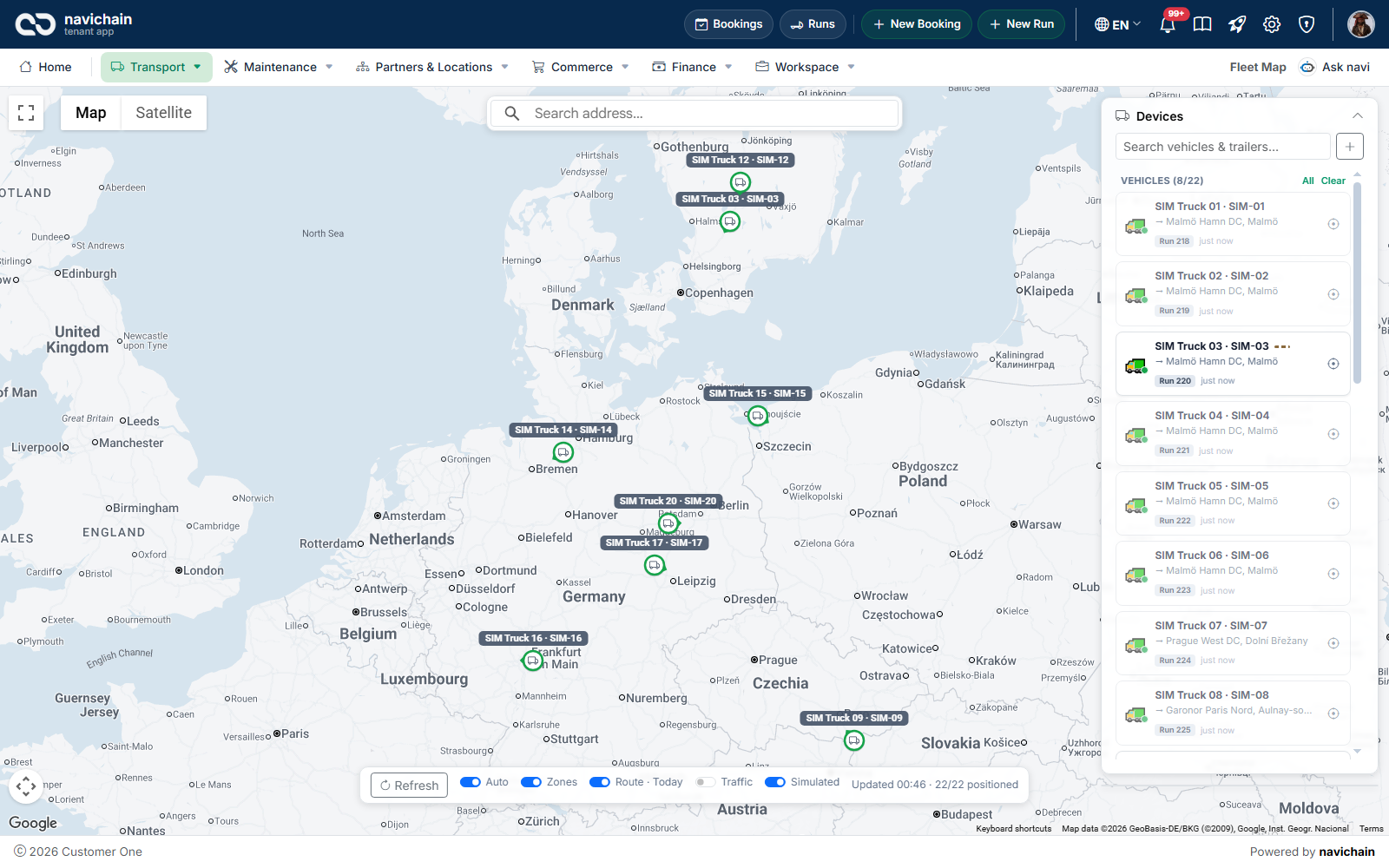
Every truck and trailer with a known position, on a real road map with satellite and traffic views. The panel beside it lists each vehicle with its run and its next stop, so “where is it” and “what is it doing” are answered together.
- Green while moving, amber while standing, grey once its last position is old — a vehicle that has gone quiet stands out
- Click a marker for speed, heading, when it last reported, and the run it is on: driver, route and stops completed
- Open the run, or the vehicle’s own tracking page, from the same card
- Your zones drawn under the fleet, and today’s route as a line behind each vehicle
- Search an address, switch to satellite, turn on live traffic
Three ways to get a position onto the map
Use one, or mix them. They land in the same place, next to the bookings they belong to.
The driver’s phone
The driver app is included on every plan. A driver switches on location sharing and the phone appears as a device — nothing to buy, fit or pay a monthly fee for.
- The position arrives with the job: the stop, the status change, the photo and the signature
- It reports the phone, not the vehicle — a trailer dropped in a yard is not on the map
- Best for everyday visibility across a mixed fleet
Telematics hardware
Plug-in and hardwired trackers report the vehicle itself. Teltonika units are supported with decoded sensor data, and other Traccar-compatible trackers report their position.
- A hardwired unit keeps reporting when the driver, the keys and the phone are gone
- Engine data — RPM, coolant temperature, fuel, AdBlue — needs an OBD-II or CAN connection; reefer temperature needs a paired Bluetooth probe
- A published add-on, priced per tracked vehicle
Tracking you already run
Already tracking with Wialon? Connect the account, pick the unit, and the vehicle appears on the same map with the same history as everything else — no second screen for dispatch.
- Wialon is supported today
- The provider stays yours: navichain reads the positions, it does not replace your hardware
- One place for dispatch — the position sits next to the booking
What you can see about a vehicle
Open any vehicle from the map, its run or the vehicle list.
The day’s route, road by road
Pick a date and load it: the route is drawn along the road network, with the day’s trips and stops listed beside it and the distance, average and top speed for the day. Stops from the last 24 hours and the vehicle’s maintenance sit in the same panel.
Vehicle data, when the hardware reads it
Ignition, motion, speed, heading, supply voltage, satellites, signal strength, fuel level, odometer and engine hours; on OBD or CAN connected units also RPM, coolant temperature, fuel percentage, AdBlue and axle loads; and temperature from a paired probe. A reading the device does not send shows as a dash — never as a zero.
Zones that tell you when a truck crosses
Draw a zone on the map — a depot, a customer’s yard, a port, a city — as a polygon or a circle, and find places by address. Choose the zones a run watches; when its truck enters or leaves one, an alert appears in the app naming the truck, the trailer and the driver.
Know when a tracker goes quiet
Every device shows live, idle or offline from its last contact, and every position carries the time it was recorded. A tracker that stopped talking is noticed by you, not by a customer asking where their pallet is.
Tracking that knows the job
A position on its own is a dot. Next to the run it is an answer.
The position sits next to the booking
The vehicle card names the run, the driver, the route and how many stops are done. From the run you can jump to the vehicle and back, so “is it late, did it arrive” is answered from one screen instead of by comparing a tracking portal with a planning system by eye.
Customers follow their own shipments
In the customer portal each customer books and tracks their own shipments, scoped to their organisation and nobody else’s — fewer status calls to your dispatchers.
A driving log the tracker fills in for you
For benefit cars and company vehicles, the driving log is the paperwork that decides how a vehicle is taxed. Trips arrive automatically from the tracker once each one ends — start and end time, distance, the odometer at both ends, the addresses and the driver’s tag. A person only adds what no device can know.
- Classify each trip as business, private or commute; a business trip needs a purpose
- The vehicle’s usage policy — benefit car or commercial vehicle — decides how private trips and commutes count under the Swedish Tax Agency’s rules
- Drivers can claim their own trips from the app for 14 days; older trips stay with the office
- A yearly report per vehicle: whether the year is complete, the odometer at both ends, totals and a split per driver — exported as CSV for Swedish Excel or printed as PDF
- Seal the year: the report is rendered once and stored with its fingerprint, and every trip in it becomes read-only
- What the tracker could not supply is shown as missing — never guessed and never shown as zero
A vehicle with no tracker has no trips recorded, and the log says so: an empty log there means nothing was measured, not that nothing was driven.
Straight answers before you buy hardware
Positioning is cheap. The expensive questions are the quiet ones.
A phone shows where the phone is
Drop a trailer in a yard and it leaves the map. If you need the trailer, fit a tracker to the trailer.
Engine data and temperature need hardware
A basic GNSS tracker reports position and its own health only. RPM, coolant and fuel need an OBD-II or CAN connection; reefer temperature needs a paired probe.
Cold-chain recording is a rule about the instrument
Regulation (EC) No 37/2005 and EN 12830 govern how temperature is recorded for quick-frozen food. Check the instrument you fit against them; it is not something software alone satisfies.
A position tied to a driver is personal data
Tell employees what is collected, why, and for how long, before go-live. Our guide to GPS options for fleets walks through what the Swedish data protection authority expects.
What it costs
Phone-based tracking costs nothing extra: the driver app is included on every plan. Trackers are optional.
Hardware de seguimiento GPS: 199 kr por dispositivo al mes, con un contrato propio.